SMART Health Links API
#Overview
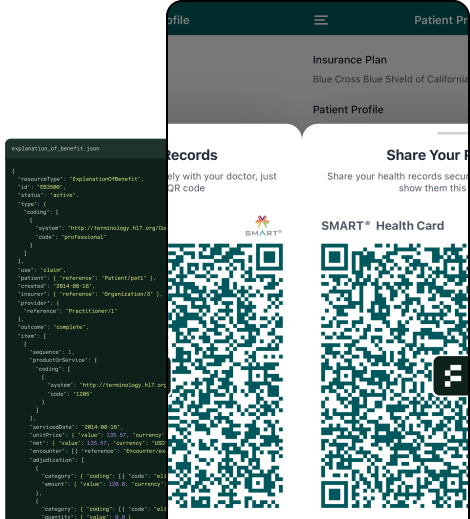
SMART Health Links (SHLs) are secure URLs using the shlink: scheme that contain encrypted health information, including SMART Health Cards.
Each link embeds a unique encryption key and manifest URL, enabling secure data sharing without confusing online portals or expensive network connection fees.
Flexpa's API fully implements the SMART Health Cards and Links STU1 specification while leveraging Flexpa's proven healthcare data infrastructure.
Perfect for healthcare applications needing to:
- Kill the clipboard and participate in CMS Aligned Networks
- Enable patient-controlled data portability and verifiable health records
- Share comprehensive records such as lab results, digital insurance cards, and visit summaries directly with patients without requiring online portals
#Why Use Flexpa?
Our SMART Health Links implementation combines full specification compliance with enterprise-grade reliability:
- Full Spec Compliance: Complete implementation of SMART Health Cards and Links STU1 specification with all required flags, status lifecycle, and support for both Manifest and Direct Transfer recipient access patterns
- Enterprise-Grade Security: JSON Web Encryption (JWE) with A256GCM algorithm, unique 32-byte keys per link, reliable cloud object storage (S3), automatic expiry (TTL), passcodes with brute-force protection, and revocation
- Production-Ready Infrastructure: Built on Flexpa's proven platform with automatic cleanup jobs, comprehensive error handling, rate limiting, and full audit logging
#How Health Links Work
When a patient receives a QR code containing their health records, that code is actually a SMART Health Link - a secure URL starting with shlink:/ that contains everything needed to decrypt and access their encrypted health data. Here's how the entire flow works from creation to access.
#Lifecycle
Creating the QR Code
1
Data Encryption
Your application sends health data to Flexpa's API, which encrypts it using AES-256-GCM encryption
2
Unique Key Generation
A unique 32-byte encryption key is generated specifically for this link - this key is not persisted by Flexpa
3
URL Creation
The encrypted data is stored securely in S3, and a shlink:/ URL is created containing both the manifest location and the encryption key
4
QR Generation
This URL can be rendered as a QR code that patients can share or print
Scanning the QR Code
5
URL Decoding
The QR scanner reads the shlink:/ URL and extracts the embedded JSON payload
6
Key Extraction
The recipient's app extracts both the manifest URL and the unique decryption key from the payload
7
Secure Retrieval
The app calls Flexpa's manifest endpoint (optionally with a passcode if required)
8
Local Decryption
Using the embedded key, the app decrypts the health data locally - Flexpa never sees the decryption key
#Security Model
Creation & Authentication
Your application authenticates with Flexpa using your Secret Key and calls the SHL creation endpoint with health data.
Input: SMART Health Cards, FHIR Bundles, Patient/$everything data
Encryption & Storage
Flexpa generates a unique 32-byte key, encrypts data with JWE/A256GCM, and stores files securely in AWS S3.
Process: Key generation → JWE encryption → S3 upload
Link Generation & Distribution
System returns a shlink: URL containing the manifest endpoint and encryption key. Share via your preferred channel.
Format:shlink:/[base64url-encoded-json]
Recipient Access
Recipients decode the base64url JSON payload, extract the manifest URL and decryption key, call the manifest endpoint, and decrypt the response locally.
Process: Decode JSON → Extract URL/key → API call → JWE decryption
Lifecycle Management
Links track access attempts, enforce policies, transition through status states, and trigger cleanup jobs when expired.
Status flow: can-change → finalized → no-longer-valid
SHL URL Structure
Typically, but not necessarily, transported as a QR code.
shlink:/eyJ1cmwiOiJodHRwczovL3NoYy5mbGV4cGEuY29tL2V4YW1wbGVzL0k5MXJoYmEzVnN1R1hHY2hjbnI2VkhsUUZLeGZFMjhrdVowc3NiRXV4bm8vbWFuaWZlc3QuanNvbiIsImtleSI6Ik0yVkNjWGxHcDdvZ2EwejZOR1JJWDgxX1lVREJqWnBwMjN2QkNtODdUNVUiLCJ2IjoxLCJsYWJlbCI6IkV4YW1wbGUgSVBTIEJ1bmRsZSIsImZsYWciOiJMVSJ9
Base64url-encoded JSON payload
{
  "url": "https://shc.flexpa.com/examples/I91rhba3VsuGXGchcnr6VHlQFKxfE28kuZ0ssbEuxno/manifest.json",
  "key": "M2VCcXlGp7oga0z6NGRIX81_YUDBjZpp23vBCm87T5U",
  "v": 1,
  "label": "Example IPS Bundle",
  "flag": "LU"
}
Decoded JSON example
Property descriptions:
url - Manifest endpoint URL
key - 43-char base64url decryption key (32 bytes)
v - Version (currently 1)
label - Optional description (≤80 chars)
flag - Optional flags (L, P, U)
exp - Optional expiration (epoch seconds)
Recipient Access Pattern
1
Decode JSON payload
Base64url decode to get manifest URL and decryption key
2
Call manifest URL
POST to extracted URL with recipient info + optional passcode
3
Receive JWE payload
Encrypted health data response
4
Decrypt locally
Use extracted 32-byte key with A256GCM algorithm
#Health Links vs Health Cards
While SMART Health Cards are tamper-proof digital credentials containing signed health data (like vaccination records), SMART Health Links provide a secure way to share those credentials and other health data through encrypted, shareable URLs. Think of SHCs as the digital certificates themselves, while SHLs are the secure delivery mechanism.
SHCs are digitally signed JWS tokens containing health data that can be verified offline. SHLs are encrypted URLs (shlink:) that can contain one or more SHCs plus additional FHIR resources. Use them together by creating SHCs for tamper-proof credentials, then packaging them into SHLs for secure sharing.
#Passcodes
SMART Health Links support optional passcode protection to add an extra layer of security for sensitive health data. When a link is created with passcode protection, recipients must provide the correct passcode to access the encrypted content.
Passcodes provide several security benefits:
- Access Control: Only recipients who know the passcode can decrypt and view the health data, even if the SHL is intercepted or shared unintentionally.
- Brute-Force Protection: The system automatically locks access after 3 failed passcode attempts, preventing unauthorized access through repeated guessing.
- Flexible Distribution: Passcodes can be shared through separate channels from the link itself (e.g., link via email, passcode via SMS), implementing a two-factor approach to data access.
Passcodes must be between 5-128 characters and cannot be used in combination with direct transfer mode (U flag), since direct file access bypasses the manifest endpoint where passcode validation occurs.
Passcode Processing Flow
1
Creation (5-128 chars)
Passcode hashed with SHA-256 before database storage
2
Validation Request
Database row locked to prevent race conditions
✓
Correct Passcode
Safe string comparison, access granted
!
Wrong Passcode
Attempt counter incremented, remaining attempts returned
✗
3rd Failed Attempt
Link automatically locked, access permanently denied
Security Features
- • Serializable database isolation level
- • Row-level locking prevents concurrent attacks
- • Constant-time hash comparison
- • Immediate lockout after 3 attempts
#Flags
SMART Health Links use single-character flags to control access behavior and link properties. Flags are concatenated alphabetically in the flag property of the JSON payload and determine how recipients can interact with the link.
Enables long-term use where the manifest can evolve over time, allowing content updates
Requires a passcode for access (5-128 characters, up to 3 attempts allowed)
Enables direct file access via GET request, bypassing manifest endpoint (incompatible with P flag)
#Manifests
The manifest is the central coordination point for accessing encrypted health data through SMART Health Links. It provides recipients with metadata about available health files and URLs to download them.
When recipients decode a SMART Health Link, they extract a manifest URL that serves as the API endpoint for accessing the encrypted content. The manifest endpoint handles two primary access patterns:
-
Standard Manifest Flow (POST): Recipients POST to the manifest URL with their identifier and optional passcode. The server validates the request, enforces security policies, and returns a structured response containing encrypted file references, status information, and download locations.
-
Direct Transfer Flow (GET): For links with the U flag, recipients can bypass the manifest entirely and GET the encrypted files directly. This streamlined approach reduces round trips but sacrifices the ability to use passcode protection.
The manifest response includes critical metadata about each file's content type, encryption status, and availability. Files may be embedded directly in the response (for smaller content) or provided as temporary download URLs (for larger files), allowing efficient handling of varying data sizes while maintaining security.
Example Manifest Response
{
  "status": "finalized",
  "files": [
    {
      "contentType": "application/smart-health-card",
      "embedded": "eyJhbGciOiJFUzI1NiIsInR5cCI6IkpXVCJ9...",
      "location": null,
      "lastUpdated": "2024-01-01T10:30:00.000Z"
    },
    {
      "contentType": "application/fhir+json",
      "embedded": null,
      "location": "https://api.flexpa.com/smart/health-links/files/abc123?token=xyz789",
      "lastUpdated": "2024-01-01T10:30:00.000Z"
    }
  ]
}
#Status
SMART Health Links contain a status value used to communicate the current state of the link and its contents to recipients. The status is returned in the manifest response and helps applications understand whether the data is stable, may change, or is no longer accessible.
Together with the L (Long-term) flag, the status can be used to enable workflows such as generating a SHL prior to data being available - such as the results of a diagnostic tests - or providing continuously updated data - such as a personal health history.
Content is stable and will not change
Content may be updated (used with long-term links)
Link has expired or been revoked, no files available
#Recipient access
1
Decode the payload
Base64url-decode the string after shlink:/ to get the JSON payload containing url, key, flag, etc.
2
Check expiration
If the exp property is present, verify the link hasn't expired before making any network requests.
3
Fetch the encrypted data
Check the flag field:
- If it includes
U: GET the url directly, the response is the JWE - Otherwise: POST to the
url with recipient (and passcode if the P flag is set). The response is a manifest containing a files array
4
Extract JWEs from the manifest
For manifest responses, check the status field, then extract each file's JWE from embedded (inline, for smaller files) or by fetching its location URL (for larger files).
5
Decrypt
Decrypt each JWE using the key from step 1. The key is a base64url-encoded 32-byte AES key; use A256GCM to decrypt.
6
Use the data
The decrypted content is your FHIR Bundle, SMART Health Card, or API access credentials depending on the file's contentType.
End-to-end example
import { compactDecrypt } from "jose";

// Step 1: Decode the payload
const b64 = shlUri.replace("shlink:/", "");
const payload = JSON.parse(
  Buffer.from(b64, "base64url").toString(),
);

// Step 2: Check expiration
if (payload.exp && payload.exp < Date.now() / 1000) {
  throw new Error("Link expired");
}

// Step 3: POST to the manifest URL
const res = await fetch(payload.url, {
  method: "POST",
  headers: { "Content-Type": "application/json" },
  body: JSON.stringify({
    recipient: "your-app-id",
    // Include passcode if P flag is set
    // passcode: "12345",
  }),
});
const manifest = await res.json();

// Step 4: Check status, then extract JWEs
if (manifest.status === "no-longer-valid") {
  throw new Error("Link is no longer valid");
}
const jweTokens = [];
for (const file of manifest.files) {
  if (file.embedded) {
    jweTokens.push(file.embedded);
  } else if (file.location) {
    const fileRes = await fetch(file.location);
    jweTokens.push(await fileRes.text());
  }
}

// Step 5: Decrypt each file
const key = Buffer.from(payload.key, "base64url");
const decrypted = [];
for (const jwe of jweTokens) {
  const { plaintext } = await compactDecrypt(jwe.trim(), key);
  decrypted.push(JSON.parse(
    new TextDecoder().decode(plaintext),
  ));
}

// Step 6: decrypted[] contains your health data
#Authenticated API
The Node SDK 2.1.0 provides typed methods for all four endpoints, including pagination and audit filters.
These endpoints authenticate with an Application Access Token in the Authorization: Bearer header. Application tokens are the primary credential for managing the SHLs created by your application. A Patient Access Token is also accepted when you need user-scoped behavior — list, revoke, and accesses are then limited to the authenticated patient's own links.
Secret keys remain temporarily supported for existing integrations. New integrations should use application tokens. All credentials are scoped by mode: test credentials can only manage test links, and live credentials can only manage live links.
POSThttps://api.flexpa.com/smart/health-links
Create a new SHL containing encrypted health data files. Returns a shareable shlink: URL with embedded encryption keys and manifest endpoint.
Integration Tip: Combine SHLs with other Flexpa APIs for powerful workflows. Use Patient/$health-cards-issue to generate SMART Health Cards from FHIR data, then package them into shareable links.
Request Parameters
- filesarrayRequired
Array of files to include in the SHL.
- contentTypestringRequired
Content type: application/smart-health-card, application/fhir+json, or application/smart-api-access.
- contentstring | objectRequired
File content - string for pre-built SHCs, object for FHIR resources or API access.
- userobject
User information for tracking and association. Required when authenticating with an Application Access Token or a Secret Key; optional when authenticating with a patient access token (externalId is then derived from the token).
- externalIdstring
Your internal user identifier for tracking. Required for Application Access Token and Secret Key authentication. With a patient access token it is optional and, if supplied, must match the token's user.
- labelstring
Optional label for the link (max 80 characters). Note: This label is embedded directly in the SHL URL and is accessible without a passcode.
- passcodestring
Optional passcode protection (5-128 characters). Cannot be used with directTransfer: true.
- ttlnumber
Time-to-live in seconds (minimum 1). Required unless longTerm: true is set; omitting both ttl and longTerm returns a 400 error (ttl is required unless longTerm is set to true).
- longTermboolean
Whether this is a long-term link. Adds L flag. Setting this to true makes ttl optional and creates a link with no expiration (expiresAt is null).
- directTransferboolean
Enable direct file transfer. Adds U flag. Cannot be used with passcode. Requires exactly one file in files; supplying multiple files returns a 400 error (Direct transfer (U flag) can only be used with a single file).
Request Size Limit: Total request payload is limited to 10MB.
Response Fields
- idstring
Unique identifier for the SHL (UUID format).
- shlstring
The complete SHL URL starting with shlink:/.
- viewerUrlstring
Direct URL to view the health data in Flexpa's viewer interface.
- manifestUrlstring
API endpoint URL for programmatic access to the encrypted manifest.
- expiresAtstring | null
ISO 8601 timestamp when the link expires, or null for long-term links.
Request
ACCESS_TOKEN=eyJhbGciOiJFUzI1NiI...
# Obtain an application token via the client credentials grant: https://www.flexpa.com/docs/consent#token
# First generate a SMART Health Card using Patient/$health-cards-issue
curl -X POST https://api.flexpa.com/smart/health-links \
  -H "Authorization: Bearer $ACCESS_TOKEN" \
  -H "Content-Type: application/json" \
  -d '{
    "files": [
      {
        "contentType": "application/smart-health-card",
        "content": "eyJhbGciOiJFUzI1NiI..."
      }
    ],
    "user": {
      "externalId": "patient-123"
    },
    "label": "Vaccination Record",
    "ttl": 86400
  }'
Response Examples
{
  "id": "f47ac10b-58cc-4372-a567-0e02b2c3d479",
  "shl": "shlink:/eyJhbGciOiJFUzI1NiI...",
  "viewerUrl": "https://shc.flexpa.com/#shlink:/eyJhbGciOiJFUzI1NiI...",
  "manifestUrl": "https://api.flexpa.com/smart/health-links/manifests/7d4c9a5e3b2f1a8c6d9e4f7a8b5c2e1d",
  "expiresAt": "2024-02-01T00:00:00.000Z"
}
GEThttps://api.flexpa.com/smart/health-links
Retrieve a paginated list of all SHLs created by your application. With a Patient Access Token, only links belonging to the authenticated patient are returned.
Request Parameters
- limitinteger
Number of results per page (1-1000, default: 20).
- cursorstring
Use the meta.nextCursor value from the previous response unchanged. Omit this parameter for the first page. Malformed or empty cursors return 400 with an Invalid cursor error.
Response Fields
- dataarray
Array of SHL objects.
- idstring
Unique identifier for the SHL.
- manifestIdstring
Unique identifier for the encrypted manifest.
- userobject
User information associated with the link.
- externalIdstring
Your internal user identifier.
- labelstring | null
Optional label for the link.
- flagsstring
SHL flags (L, P, U combinations).
- expiresAtstring | null
ISO 8601 expiration timestamp, or null for long-term links.
- revokedAtstring | null
ISO 8601 timestamp when revoked, or null if active.
- createdAtstring
ISO 8601 timestamp when the link was created.
- updatedAtstring
ISO 8601 timestamp when the link was last updated.
- fileCountnumber
Number of files contained in the link.
- totalSizenumber
Total size of all files in bytes.
- accessCountnumber
Number of successful accesses to the link.
- lastAccessedAtstring | null
ISO 8601 timestamp of the latest successful access, or null if the link has not been accessed successfully.
- metaobject
Pagination metadata.
- hasMoreboolean
Whether more results are available.
- nextCursorstring | null
Cursor for the next page, or null if no more pages.
Request
ACCESS_TOKEN=eyJhbGciOiJFUzI1NiI...
# Obtain an application token via the client credentials grant: https://www.flexpa.com/docs/consent#token
curl https://api.flexpa.com/smart/health-links?limit=10 \
  -H "Authorization: Bearer $ACCESS_TOKEN"
Response Example
{
  "data": [{
    "id": "a1b2c3d4-e5f6-4789-abc1-23def4567890",
    "manifestId": "9a8b7c6d5e4f3a2b1c0d9e8f7a6b5c4d",
    "user": {"externalId": "patient-123"},
    "label": "Lab Results",
    "flags": "LP",
    "expiresAt": "2024-02-01T00:00:00.000Z",
    "revokedAt": null,
    "createdAt": "2024-01-01T10:30:00.000Z",
    "updatedAt": "2024-01-01T10:30:00.000Z",
    "fileCount": 1,
    "totalSize": 2048,
    "accessCount": 3,
    "lastAccessedAt": "2024-01-01T11:00:00.000Z"
  }],
  "meta": {
    "hasMore": true,
    "nextCursor": "eyJjcmVhdGVkQXQi..."
  }
}
GEThttps://api.flexpa.com/smart/health-links/stats
Count links created in the selected period and their successful accesses.
Links created before the period are excluded.
Request parameters
- lookbackDaysinteger
Days to include (1–365, default: 30). The rolling UTC window ends at the
time of the request.
Response fields
- dataobject
Totals for links created during period, including expired or revoked links.
- linksCreatedinteger
Links created.
- linksAccessedinteger
Links with a recorded successful access by period.end.
- usersWithLinksinteger
Distinct owners of those links.
- usersWithAccessesinteger
Distinct owners of successfully accessed links.
- successfulAccessesinteger
Recorded successful accesses by period.end, including repeats.
- timeSeriesarray
Counts by UTC link creation date, oldest first, including dates with no
activity. Later accesses count toward the link's creation date. Daily user
counts cannot be summed; use data for distinct-user totals.
- datestring
Link creation date (YYYY-MM-DD).
- linksCreatedinteger
Links created on this date.
- linksAccessedinteger
Those links with a recorded successful access by period.end.
- usersWithLinksinteger
Distinct owners of links created on this date.
- usersWithAccessesinteger
Distinct owners of successfully accessed links created on this date.
- successfulAccessesinteger
Recorded successful accesses to those links by period.end, including repeats.
- periodobject
Reporting window, inclusive.
- startstring
ISO 8601 UTC start timestamp.
- endstring
ISO 8601 UTC end timestamp.
Access counts do not confirm QR scans or file downloads. Activity before
access auditing was enabled is not backfilled.
Request
GET
/smart/health-links/statsACCESS_TOKEN=eyJhbGciOiJFUzI1NiI...
curl 'https://api.flexpa.com/smart/health-links/stats?lookbackDays=1' \
-H "Authorization: Bearer $ACCESS_TOKEN"
Response example
{
  "data": {
    "linksCreated": 12,
    "linksAccessed": 8,
    "usersWithLinks": 10,
    "usersWithAccesses": 7,
    "successfulAccesses": 18
  },
  "timeSeries": [
    {
      "date": "2026-09-09",
      "linksCreated": 12,
      "linksAccessed": 8,
      "usersWithLinks": 10,
      "usersWithAccesses": 7,
      "successfulAccesses": 18
    },
    {
      "date": "2026-09-10",
      "linksCreated": 0,
      "linksAccessed": 0,
      "usersWithLinks": 0,
      "usersWithAccesses": 0,
      "successfulAccesses": 0
    }
  ],
  "period": {
    "start": "2026-09-09T12:00:00.000Z",
    "end": "2026-09-10T12:00:00.000Z"
  }
}
DELETEhttps://api.flexpa.com/smart/health-links/{id}
Permanently revoke a SHL, making it inaccessible and scheduling file deletion.
Permanent Action: Revocation cannot be undone. All associated files will be deleted from storage.
Request Parameters
- idstringRequired
The UUID of the SHL to revoke (path parameter).
Request
DELETE
/smart/health-links/{id}ACCESS_TOKEN=eyJhbGciOiJFUzI1NiI...
# Obtain an application token via the client credentials grant: https://www.flexpa.com/docs/consent#token
curl -X DELETE https://api.flexpa.com/smart/health-links/f47ac10b-58cc-4372-a567-0e02b2c3d479 \
-H "Authorization: Bearer $ACCESS_TOKEN"
Response Examples
HTTP/1.1 204 No Content
(empty body)
GEThttps://api.flexpa.com/smart/health-links/{id}/accesses
Retrieve the audit trail of access events for a SHL — who attempted to access the link, when, and with what outcome. Application tokens can read the trail for any link belonging to their application; patient access tokens see only events for their own links.
Request Headers
- AuthorizationstringRequired
An Authorization: Bearer header value must be presented with an Application Access Token. A Patient Access Token is also accepted but can only read access events for the authenticated patient's own links.
Request Parameters
- idstringRequired
The UUID of the SHL to inspect (path parameter).
- limitinteger
Number of results per page (1-100, default: 20).
- cursorstring
Use the cursor from the Bundle's next link unchanged, or follow that link directly. Omit this parameter for the first page. Malformed or empty cursors return 400 with an Invalid cursor error.
- statusstring
Filter by access status: SUCCEEDED, PASSCODE_REQUIRED, INVALID_PASSCODE, LOCKED, EXPIRED, or REVOKED.
- typestring
Filter by access type: MANIFEST or DIRECT.
Response Fields
- resourceTypestring
Always Bundle.
- typestring
Always searchset.
- linkarray
Bundle links: a self link to the request URL and, when more results exist, a next link with the next cursor.
- entryarray
Array of access events, newest first. Omitted when no events match. Each entry has a stable fullUrl (urn:uuid:{event-id}) and a resource containing the following FHIR AuditEvent fields:
- resourceTypestring
Always AuditEvent.
- idstring
Unique identifier for the access event.
- typeobject
The rest code from the FHIR audit event type code system, identifying a RESTful operation.
- subtypearray
The read code from the FHIR RESTful interaction code system.
- actionstring
Always R (read).
- outcomestring
FHIR outcome code: 0 success, 4 minor failure (incorrect or missing passcode), 8 serious failure (locked, expired, or revoked links).
- outcomeDescstring
The access status: SUCCEEDED, PASSCODE_REQUIRED, INVALID_PASSCODE, LOCKED, EXPIRED, or REVOKED.
- recordedstring
ISO 8601 timestamp when the access occurred.
- agentarray
Who performed the access.
- whoobject
- displaystring
The recipient identifier supplied to the manifest or direct transfer request, or Unknown.
- requestorboolean
Always true.
- sourceobject
Identifies the observer as Flexpa SMART Health Links.
- entityarray
The accessed SHL.
- whatobject
- identifierobject
- valuestring
The id of the SHL.
- namestring
The SHL label, when set.
- extensionarray
Flexpa extension at https://flexpa.com/docs/shl#access-event with an accessType code (MANIFEST or DIRECT) and the access status code.
Request
GET
/smart/health-links/{id}/accessesACCESS_TOKEN=eyJhbGciOiJFUzI1NiI...
# Obtain an application token via the client credentials grant: https://www.flexpa.com/docs/consent#token
curl "https://api.flexpa.com/smart/health-links/f47ac10b-58cc-4372-a567-0e02b2c3d479/accesses?limit=20" \
-H "Authorization: Bearer $ACCESS_TOKEN"
Response Examples
{
  "resourceType": "Bundle",
  "type": "searchset",
  "link": [
    {
      "relation": "self",
      "url": "https://api.flexpa.com/smart/health-links/f47ac10b-58cc-4372-a567-0e02b2c3d479/accesses?limit=20"
    }
  ],
  "entry": [
    {
      "fullUrl": "urn:uuid:55c2f4a1-9d83-4b2c-9876-543210abcdef",
      "resource": {
        "resourceType": "AuditEvent",
        "id": "55c2f4a1-9d83-4b2c-9876-543210abcdef",
        "type": {
          "system": "http://terminology.hl7.org/CodeSystem/audit-event-type",
          "code": "rest",
          "display": "RESTful Operation"
        },
        "subtype": [
          {
            "system": "http://hl7.org/fhir/restful-interaction",
            "code": "read",
            "display": "read"
          }
        ],
        "action": "R",
        "recorded": "2024-01-01T10:30:00.000Z",
        "outcome": "0",
        "outcomeDesc": "SUCCEEDED",
        "agent": [
          {
            "who": { "display": "patient-123" },
            "requestor": true
          }
        ],
        "source": { "observer": { "display": "Flexpa SMART Health Links" } },
        "entity": [
          {
            "what": {
              "identifier": {
                "system": "https://api.flexpa.com/smart/health-links",
                "value": "f47ac10b-58cc-4372-a567-0e02b2c3d479"
              }
            },
            "name": "Vaccination Record"
          }
        ],
        "extension": [
          {
            "url": "https://flexpa.com/docs/shl#access-event",
            "extension": [
              { "url": "accessType", "valueCode": "MANIFEST" },
              { "url": "status", "valueCode": "SUCCEEDED" }
            ]
          }
        ]
      }
    }
  ]
}
#Manifest and Direct Transfer
These endpoints are accessible to end recipients of SHLs and do not require a Secret Key. Access is controlled through the encryption keys and optional passcodes embedded in the SHL URL.
GEThttps://api.flexpa.com/smart/health-links/manifests/{manifestId}
Direct download of encrypted health data files. Only available for links with the U flag enabled.
Flag Restriction: This endpoint only works with links that have the U (Direct Transfer) flag. Links with both U and P flags are invalid.
Parameters
- manifestIdstringRequired
The manifest ID from the SHL (path parameter).
- recipientstring
Optional recipient identifier (query parameter).
Response Fields
- Content-Typeheader
Set to application/jose for JWE-encrypted content.
- Response Bodystring
JWE (JSON Web Encryption) string using A256GCM algorithm. Decrypt using the 32-byte key embedded in the original SHL URL payload.
Request
GET
/smart/health-links/manifests/{manifestId}curl https://api.flexpa.com/smart/health-links/manifests/7d4c9a5e3b2f1a8c6d9e4f7a8b5c2e1d
Response Examples
HTTP/1.1 200 OK
Content-Type: application/jose

eyJhbGciOiJkaXIiLCJlbmMiOiJBMjU2R0NNIn0..iv8E9W3flKTiZhYeAW3Se.4hU4gz
mSH5K6E5WCekMtV8u9-g_bCh5lUhcmAJI9EqTvJZLKqttqHpLJiyqk0jRl-BqRDjNiU2r
IeqZVb0k2JPj7IuR8qVzN8kpmw0K8fvPhKMmjmC41ydPG1sqVvgPYN0nz8sT5x5Z2MpYV
8N6iNwAjhSNnqYk3jJGmCLNMOKpEhHz7kN-d4fWqR3X9iG7Lh2xuEOLed7_27dxcpvnS2
ScbvhzPqhYqiVF7KQ3mTbWcKdxNM5KkrCw.Bx8xiafv0c-uVEXy_6q-jg
POSThttps://api.flexpa.com/smart/health-links/manifests/{manifestId}
Recipients use this endpoint to retrieve the encrypted health data from a SHL.
Request Parameters
- recipientstringRequired
Identifier for the requesting party.
- passcodestring
Required if the link has passcode protection (max 128 characters).
- embeddedLengthMaxnumber
Maximum byte length for embedded content (minimum 0). When omitted, all files are embedded; set to 0 to force every file to be returned as a location URL; set to N to embed only files <= N bytes.
Response Fields
- statusstring
Indicates file changeability: finalized (stable), can-change (may evolve), or no-longer-valid (expired/revoked).
- filesarray
Array of encrypted health data files following the SHLs manifest structure.
- contentTypestring
MIME type: application/smart-health-card, application/fhir+json, or application/smart-api-access.
- embeddedstring | null
JWE-encrypted file content (base64url encoded) if within size limits, otherwise null.
- locationstring | null
Short-lived URL for downloading large encrypted files, or null if embedded.
- remainingAttemptsnumber | null
Number of passcode attempts remaining (only included for incorrect passcode errors).
Request
POST
/smart/health-links/manifests/{manifestId}curl -X POST https://api.flexpa.com/smart/health-links/manifests/7d4c9a5e3b2f1a8c6d9e4f7a8b5c2e1d \
-H "Content-Type: application/json" \
-d '{
"recipient": "healthcare-provider-id",
"passcode": "12345"
}'
Response Examples
{
  "status": "finalized",
  "files": [{
    "contentType": "application/smart-health-card",
    "embedded": "eyJhbGciOiJFUzI1NiI...",
    "lastUpdated": "2024-01-01T10:30:00.000Z"
  }]
}